---
title: "Skill authoring best practices"
description: "> Learn how to write effective Skills that Claude can discover and use successfully."
type: skill
canonical_url: https://claudary.paisolsolutions.com/skills/anthropic-best-practices
source: "Claudary"
difficulty: intermediate
author: "Claude Code Knowledge Pack"
date: 2026-07-10T11:07:31.978Z
license: CC-BY-4.0
attribution: "Skill authoring best practices — Claudary (https://claudary.paisolsolutions.com/skills/anthropic-best-practices)"
---
# Skill authoring best practices
> Learn how to write effective Skills that Claude can discover and use successfully.
## Overview
# Skill authoring best practices
> Learn how to write effective Skills that Claude can discover and use successfully.
Good Skills are concise, well-structured, and tested with real usage. This guide provides practical authoring decisions to help you write Skills that Claude can discover and use effectively.
For conceptual background on how Skills work, see the [Skills overview](/en/docs/agents-and-tools/agent-skills/overview).
## Core principles
### Concise is key
The [context window](https://platform.claude.com/docs/en/build-with-claude/context-windows) is a public good. Your Skill shares the context window with everything else Claude needs to know, including:
* The system prompt
* Conversation history
* Other Skills' metadata
* Your actual request
Not every token in your Skill has an immediate cost. At startup, only the metadata (name and description) from all Skills is pre-loaded. Claude reads SKILL.md only when the Skill becomes relevant, and reads additional files only as needed. However, being concise in SKILL.md still matters: once Claude loads it, every token competes with conversation history and other context.
**Default assumption**: Claude is already very smart
Only add context Claude doesn't already have. Challenge each piece of information:
* "Does Claude really need this explanation?"
* "Can I assume Claude knows this?"
* "Does this paragraph justify its token cost?"
**Good example: Concise** (approximately 50 tokens):
````markdown theme={null}
## Extract PDF text
Use pdfplumber for text extraction:
```python
import pdfplumber
with pdfplumber.open("file.pdf") as pdf:
text = pdf.pages[0].extract_text()
```
````
**Bad example: Too verbose** (approximately 150 tokens):
```markdown theme={null}
## Extract PDF text
PDF (Portable Document Format) files are a common file format that contains
text, images, and other content. To extract text from a PDF, you'll need to
use a library. There are many libraries available for PDF processing, but we
recommend pdfplumber because it's easy to use and handles most cases well.
First, you'll need to install it using pip. Then you can use the code below...
```
The concise version assumes Claude knows what PDFs are and how libraries work.
### Set appropriate degrees of freedom
Match the level of specificity to the task's fragility and variability.
**High freedom** (text-based instructions):
Use when:
* Multiple approaches are valid
* Decisions depend on context
* Heuristics guide the approach
Example:
```markdown theme={null}
## Code review process
1. Analyze the code structure and organization
2. Check for potential bugs or edge cases
3. Suggest improvements for readability and maintainability
4. Verify adherence to project conventions
```
**Medium freedom** (pseudocode or scripts with parameters):
Use when:
* A preferred pattern exists
* Some variation is acceptable
* Configuration affects behavior
Example:
````markdown theme={null}
## Generate report
Use this template and customize as needed:
```python
def generate_report(data, format="markdown", include_charts=True):
# Process data
# Generate output in specified format
# Optionally include visualizations
```
````
**Low freedom** (specific scripts, few or no parameters):
Use when:
* Operations are fragile and error-prone
* Consistency is critical
* A specific sequence must be followed
Example:
````markdown theme={null}
## Database migration
Run exactly this script:
```bash
python scripts/migrate.py --verify --backup
```
Do not modify the command or add additional flags.
````
**Analogy**: Think of Claude as a robot exploring a path:
* **Narrow bridge with cliffs on both sides**: There's only one safe way forward. Provide specific guardrails and exact instructions (low freedom). Example: database migrations that must run in exact sequence.
* **Open field with no hazards**: Many paths lead to success. Give general direction and trust Claude to find the best route (high freedom). Example: code reviews where context determines the best approach.
### Test with all models you plan to use
Skills act as additions to models, so effectiveness depends on the underlying model. Test your Skill with all the models you plan to use it with.
**Testing considerations by model**:
* **Claude Haiku** (fast, economical): Does the Skill provide enough guidance?
* **Claude Sonnet** (balanced): Is the Skill clear and efficient?
* **Claude Opus** (powerful reasoning): Does the Skill avoid over-explaining?
What works perfectly for Opus might need more detail for Haiku. If you plan to use your Skill across multiple models, aim for instructions that work well with all of them.
## Skill structure
**YAML Frontmatter**: The SKILL.md frontmatter requires two fields:
* `name` - Human-readable name of the Skill (64 characters maximum)
* `description` - One-line description of what the Skill does and when to use it (1024 characters maximum)
For complete Skill structure details, see the [Skills overview](/en/docs/agents-and-tools/agent-skills/overview#skill-structure).
### Naming conventions
Use consistent naming patterns to make Skills easier to reference and discuss. We recommend using **gerund form** (verb + -ing) for Skill names, as this clearly describes the activity or capability the Skill provides.
**Good naming examples (gerund form)**:
* "Processing PDFs"
* "Analyzing spreadsheets"
* "Managing databases"
* "Testing code"
* "Writing documentation"
**Acceptable alternatives**:
* Noun phrases: "PDF Processing", "Spreadsheet Analysis"
* Action-oriented: "Process PDFs", "Analyze Spreadsheets"
**Avoid**:
* Vague names: "Helper", "Utils", "Tools"
* Overly generic: "Documents", "Data", "Files"
* Inconsistent patterns within your skill collection
Consistent naming makes it easier to:
* Reference Skills in documentation and conversations
* Understand what a Skill does at a glance
* Organize and search through multiple Skills
* Maintain a professional, cohesive skill library
### Writing effective descriptions
The `description` field enables Skill discovery and should include both what the Skill does and when to use it.
**Always write in third person**. The description is injected into the system prompt, and inconsistent point-of-view can cause discovery problems.
* **Good:** "Processes Excel files and generates reports"
* **Avoid:** "I can help you process Excel files"
* **Avoid:** "You can use this to process Excel files"
**Be specific and include key terms**. Include both what the Skill does and specific triggers/contexts for when to use it.
Each Skill has exactly one description field. The description is critical for skill selection: Claude uses it to choose the right Skill from potentially 100+ available Skills. Your description must provide enough detail for Claude to know when to select this Skill, while the rest of SKILL.md provides the implementation details.
Effective examples:
**PDF Processing skill:**
```yaml theme={null}
description: Extract text and tables from PDF files, fill forms, merge documents. Use when working with PDF files or when the user mentions PDFs, forms, or document extraction.
```
**Excel Analysis skill:**
```yaml theme={null}
description: Analyze Excel spreadsheets, create pivot tables, generate charts. Use when analyzing Excel files, spreadsheets, tabular data, or .xlsx files.
```
**Git Commit Helper skill:**
```yaml theme={null}
description: Generate descriptive commit messages by analyzing git diffs. Use when the user asks for help writing commit messages or reviewing staged changes.
```
Avoid vague descriptions like these:
```yaml theme={null}
description: Helps with documents
```
```yaml theme={null}
description: Processes data
```
```yaml theme={null}
description: Does stuff with files
```
### Progressive disclosure patterns
SKILL.md serves as an overview that points Claude to detailed materials as needed, like a table of contents in an onboarding guide. For an explanation of how progressive disclosure works, see [How Skills work](/en/docs/agents-and-tools/agent-skills/overview#how-skills-work) in the overview.
**Practical guidance:**
* Keep SKILL.md body under 500 lines for optimal performance
* Split content into separate files when approaching this limit
* Use the patterns below to organize instructions, code, and resources effectively
#### Visual overview: From simple to complex
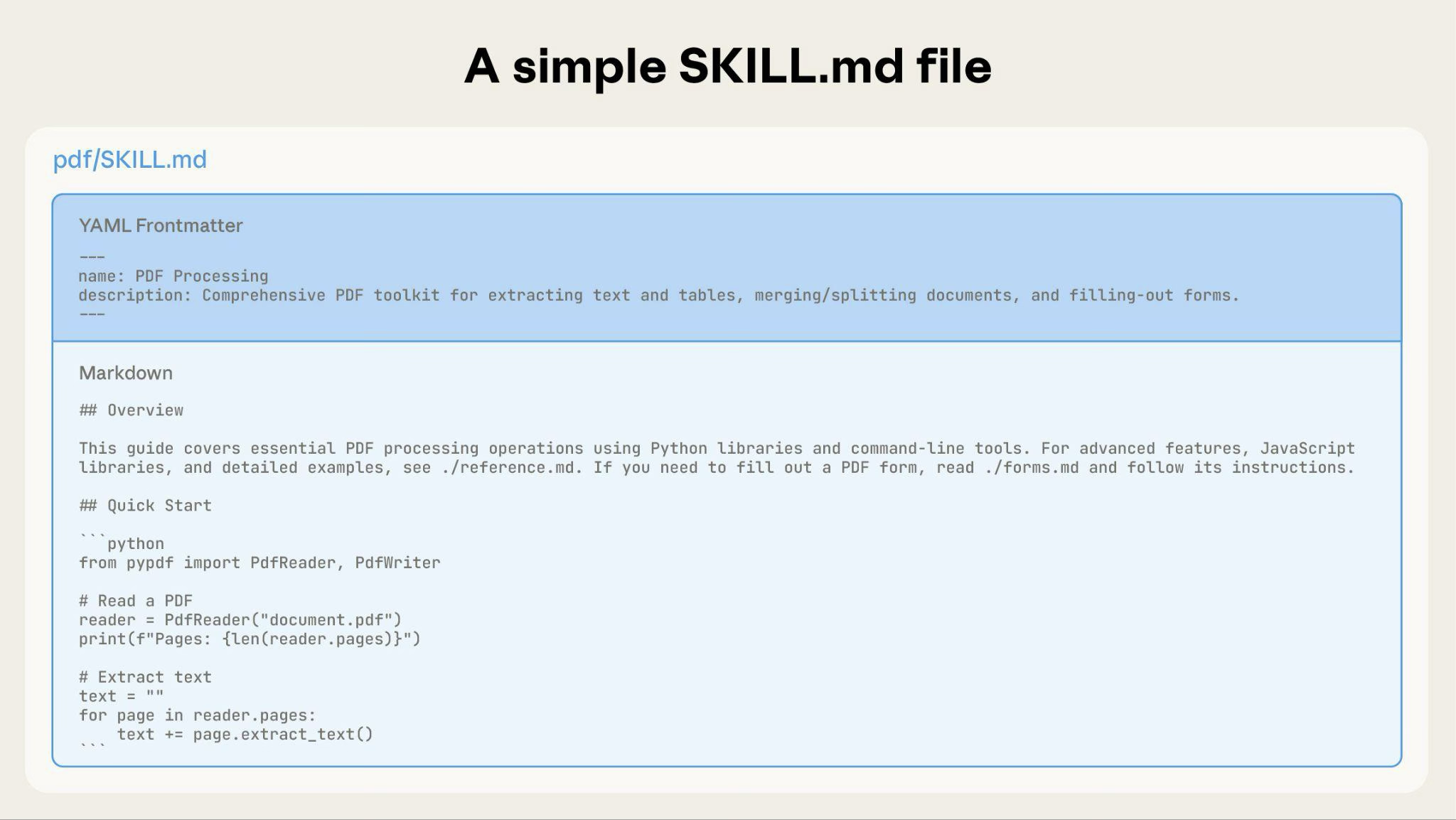
A basic Skill starts with just a SKILL.md file containing metadata and instructions:
 As your Skill grows, you can bundle additional content that Claude loads only when needed:
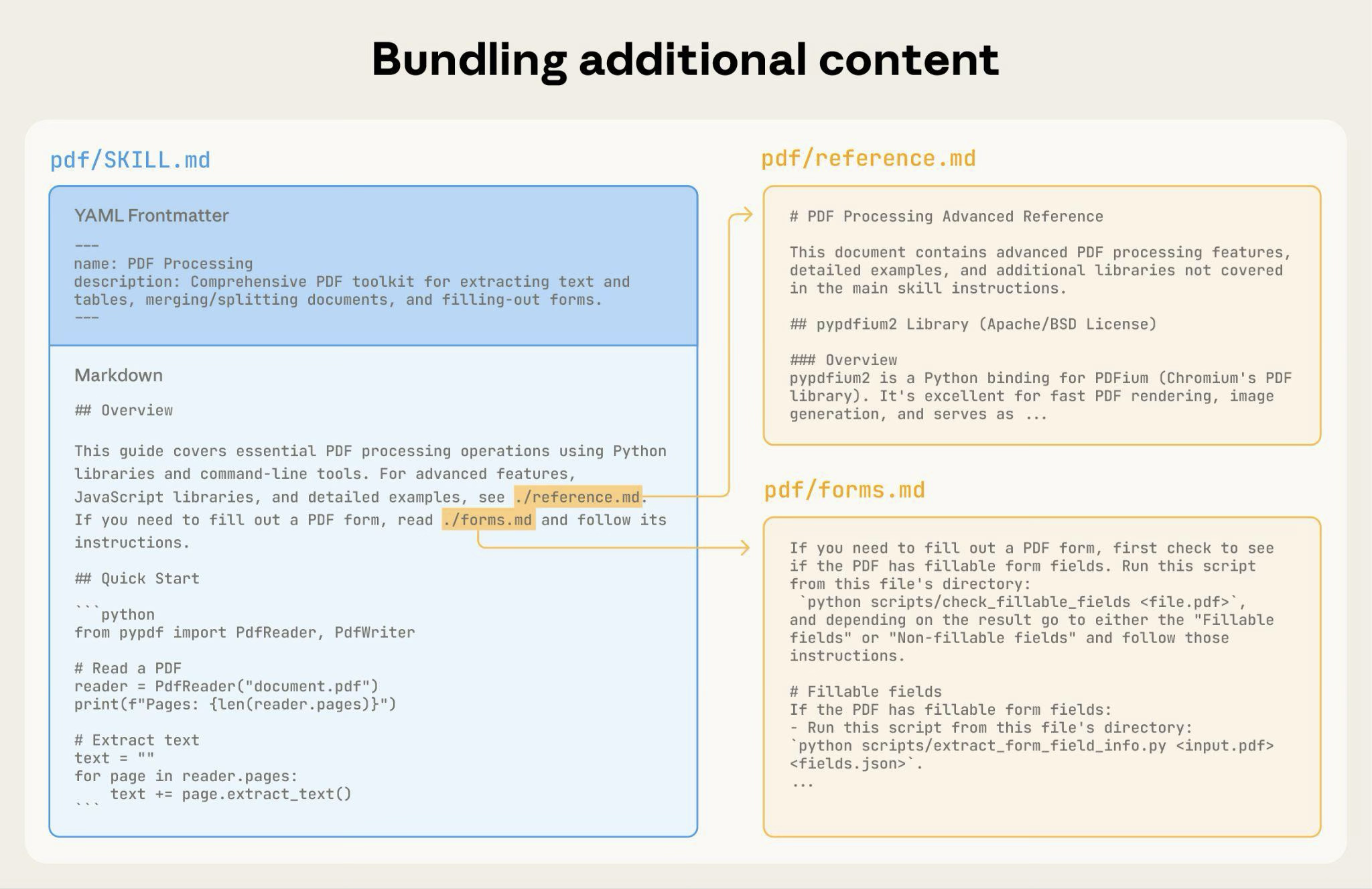 The complete Skill directory structure might look like this:
```
pdf/
├── SKILL.md # Main instructions (loaded when triggered)
├── FORMS.md # Form-filling guide (loaded as needed)
├── reference.md # API reference (loaded as needed)
├── examples.md # Usage examples (loaded as needed)
└── scripts/
├── analyze_form.py # Utility script (executed, not loaded)
├── fill_form.py # Form filling script
└── validate.py # Validation script
```
#### Pattern 1: High-level guide with references
````markdown theme={null}
---
name: PDF Processing
description: Extracts text and tables from PDF files, fills forms, and merges documents. Use when working with PDF files or when the user mentions PDFs, forms, or document extraction.
---
# PDF Processing
## Quick start
Extract text with pdfplumber:
```python
import pdfplumber
with pdfplumber.open("file.pdf") as pdf:
text = pdf.pages[0].extract_text()
```
## Advanced features
**Form filling**: See [FORMS.md](FORMS.md) for complete guide
**API reference**: See [REFERENCE.md](REFERENCE.md) for all methods
**Examples**: See [EXAMPLES.md](EXAMPLES.md) for common patterns
````
Claude loads FORMS.md, REFERENCE.md, or EXAMPLES.md only when needed.
#### Pattern 2: Domain-specific organization
For Skills with multiple domains, organize content by domain to avoid loading irrelevant context. When a user asks about sales metrics, Claude only needs to read sales-related schemas, not finance or marketing data. This keeps token usage low and context focused.
```
bigquery-skill/
├── SKILL.md (overview and navigation)
└── reference/
├── finance.md (revenue, billing metrics)
├── sales.md (opportunities, pipeline)
├── product.md (API usage, features)
└── marketing.md (campaigns, attribution)
```
````markdown SKILL.md theme={null}
# BigQuery Data Analysis
## Available datasets
**Finance**: Revenue, ARR, billing → See [reference/finance.md](reference/finance.md)
**Sales**: Opportunities, pipeline, accounts → See [reference/sales.md](reference/sales.md)
**Product**: API usage, features, adoption → See [reference/product.md](reference/product.md)
**Marketing**: Campaigns, attribution, email → See [reference/marketing.md](reference/marketing.md)
## Quick search
Find specific metrics using grep:
```bash
grep -i "revenue" reference/finance.md
grep -i "pipeline" reference/sales.md
grep -i "api usage" reference/product.md
```
````
#### Pattern 3: Conditional details
Show basic content, link to advanced content:
```markdown theme={null}
# DOCX Processing
## Creating documents
Use docx-js for new documents. See [DOCX-JS.md](DOCX-JS.md).
## Editing documents
For simple edits, modify the XML directly.
**For tracked changes**: See [REDLINING.md](REDLINING.md)
**For OOXML details**: See [OOXML.md](OOXML.md)
```
Claude reads REDLINING.md or OOXML.md only when the user needs those features.
### Avoid deeply nested references
Claude may partially read files when they're referenced from other referenced files. When encountering nested references, Claude might use commands like `head -100` to preview content rather than reading enti
---
Source: [Claudary](https://claudary.paisolsolutions.com/skills/anthropic-best-practices) · https://claudary.paisolsolutions.com
The complete Skill directory structure might look like this:
```
pdf/
├── SKILL.md # Main instructions (loaded when triggered)
├── FORMS.md # Form-filling guide (loaded as needed)
├── reference.md # API reference (loaded as needed)
├── examples.md # Usage examples (loaded as needed)
└── scripts/
├── analyze_form.py # Utility script (executed, not loaded)
├── fill_form.py # Form filling script
└── validate.py # Validation script
```
#### Pattern 1: High-level guide with references
````markdown theme={null}
---
name: PDF Processing
description: Extracts text and tables from PDF files, fills forms, and merges documents. Use when working with PDF files or when the user mentions PDFs, forms, or document extraction.
---
# PDF Processing
## Quick start
Extract text with pdfplumber:
```python
import pdfplumber
with pdfplumber.open("file.pdf") as pdf:
text = pdf.pages[0].extract_text()
```
## Advanced features
**Form filling**: See [FORMS.md](FORMS.md) for complete guide
**API reference**: See [REFERENCE.md](REFERENCE.md) for all methods
**Examples**: See [EXAMPLES.md](EXAMPLES.md) for common patterns
````
Claude loads FORMS.md, REFERENCE.md, or EXAMPLES.md only when needed.
#### Pattern 2: Domain-specific organization
For Skills with multiple domains, organize content by domain to avoid loading irrelevant context. When a user asks about sales metrics, Claude only needs to read sales-related schemas, not finance or marketing data. This keeps token usage low and context focused.
```
bigquery-skill/
├── SKILL.md (overview and navigation)
└── reference/
├── finance.md (revenue, billing metrics)
├── sales.md (opportunities, pipeline)
├── product.md (API usage, features)
└── marketing.md (campaigns, attribution)
```
````markdown SKILL.md theme={null}
# BigQuery Data Analysis
## Available datasets
**Finance**: Revenue, ARR, billing → See [reference/finance.md](reference/finance.md)
**Sales**: Opportunities, pipeline, accounts → See [reference/sales.md](reference/sales.md)
**Product**: API usage, features, adoption → See [reference/product.md](reference/product.md)
**Marketing**: Campaigns, attribution, email → See [reference/marketing.md](reference/marketing.md)
## Quick search
Find specific metrics using grep:
```bash
grep -i "revenue" reference/finance.md
grep -i "pipeline" reference/sales.md
grep -i "api usage" reference/product.md
```
````
#### Pattern 3: Conditional details
Show basic content, link to advanced content:
```markdown theme={null}
# DOCX Processing
## Creating documents
Use docx-js for new documents. See [DOCX-JS.md](DOCX-JS.md).
## Editing documents
For simple edits, modify the XML directly.
**For tracked changes**: See [REDLINING.md](REDLINING.md)
**For OOXML details**: See [OOXML.md](OOXML.md)
```
Claude reads REDLINING.md or OOXML.md only when the user needs those features.
### Avoid deeply nested references
Claude may partially read files when they're referenced from other referenced files. When encountering nested references, Claude might use commands like `head -100` to preview content rather than reading enti
---
Source: [Claudary](https://claudary.paisolsolutions.com/skills/anthropic-best-practices) · https://claudary.paisolsolutions.com